How I work with agents on an infinite canvas
Contents
Working with many agents
I work with terminal agents for coding, life admin and everything in-between. Whether or not the terminal is the best agentic interface, I like that it feels consistent, vendor-neutral and flexible.
As I started working with more agents in parallel, I found myself losing terminal windows, forgetting to check on agents, and clumsily copy-pasting context and output.
At the same time, the AI tooling narrative shifted to orchestration. I heard people talking about delegating to agent fleets exclusively from Slack and their mobile devices.
According to Steve Yegge’s 8 levels of AI adoption, my workflow was several rungs below the frontier.
| Level | What it looks like |
|---|---|
| 1 | No AI |
| 2 | Coding agent in the IDE, permissions on |
| 3 | Coding agent in the IDE, YOLO mode |
| 4 | You follow the conversation, not the diff |
| 5 | CLI-first: “I just want the agent and I’ll look at the code in my IDE later” |
| 6 | Several agents at once, multiplexing between them |
| 7 | 10+ agents, managed by hand |
| 8 | You build your own orchestrator |
My CLI-first workflow sat at level 5, below the multi-agent and orchestration stages. Source: Gergely Orosz, Steve Yegge on AI Agents and the Future of Software Engineering, The Pragmatic Engineer, 10 February 2026.
Were people moving away from terminal agents? Going from chatgpt.com to Claude Code felt natural, but this felt a bit sudden.
I found Addy Osmani’s Conductor vs Orchestrator analogy to make things a little clearer:
- Conducting: pairing synchronously with one agent on an interactive task, like debugging an algorithm or creating an architecture diagram step-by-step.
- Orchestrating: delegating asynchronous work to autonomous agents and reviewing when the work is finished.
At a software company, orchestration might mean large fleets of cloud agents pointed at a Jira backlog, with a control plane and a lot of infrastructure. But for me, it’s mostly about getting terminal agents to collaborate in the background without friction.
| Local orchestrator | Cloud orchestrator | |
|---|---|---|
| Runs on | Your machine | Vendor infrastructure |
| Isolation | Worktrees | Containers / VMs per agent |
| Review unit | Diff in your editor | PR or deploy preview |
| Cost model | Your existing subscriptions | Per-task or per-hour billing |
| Typical scope | 2–8 sub-tasks per prompt | End-to-end feature |
Source: RunPane.
Conducting and orchestrating should coexist, and transitioning between them should be easy. I thought the terminal was already pretty good at conducting, but not at orchestrating.
I tried a few tmux-based terminal session managers, like ntm. This addressed window sprawl by putting each terminal in one big window. It made orchestration a bit easier because I could see all the terminals and their statuses. But it also made conducting harder, since each terminal was now siloed from the browser tabs or other windows relevant to its task.1
Further down the rabbithole, I stumbled upon Maestri, which approached the problem quite differently.2
Maestri puts terminal agents on a canvas alongside notes, sketches, and browser portals.3 Think of running Claude Code inside Figma or Miro, with a native CLI for agents to see and manipulate the contents of the canvas. For example, an agent can spawn and write to a sticky note (or even another agent!) right beside it.
The demo below shows how it looks to build a simple calculator in Maestri (screenshot of my real canvas in tab 2):
Claude sketches three calculator designs, I pick one, and Codex builds it.
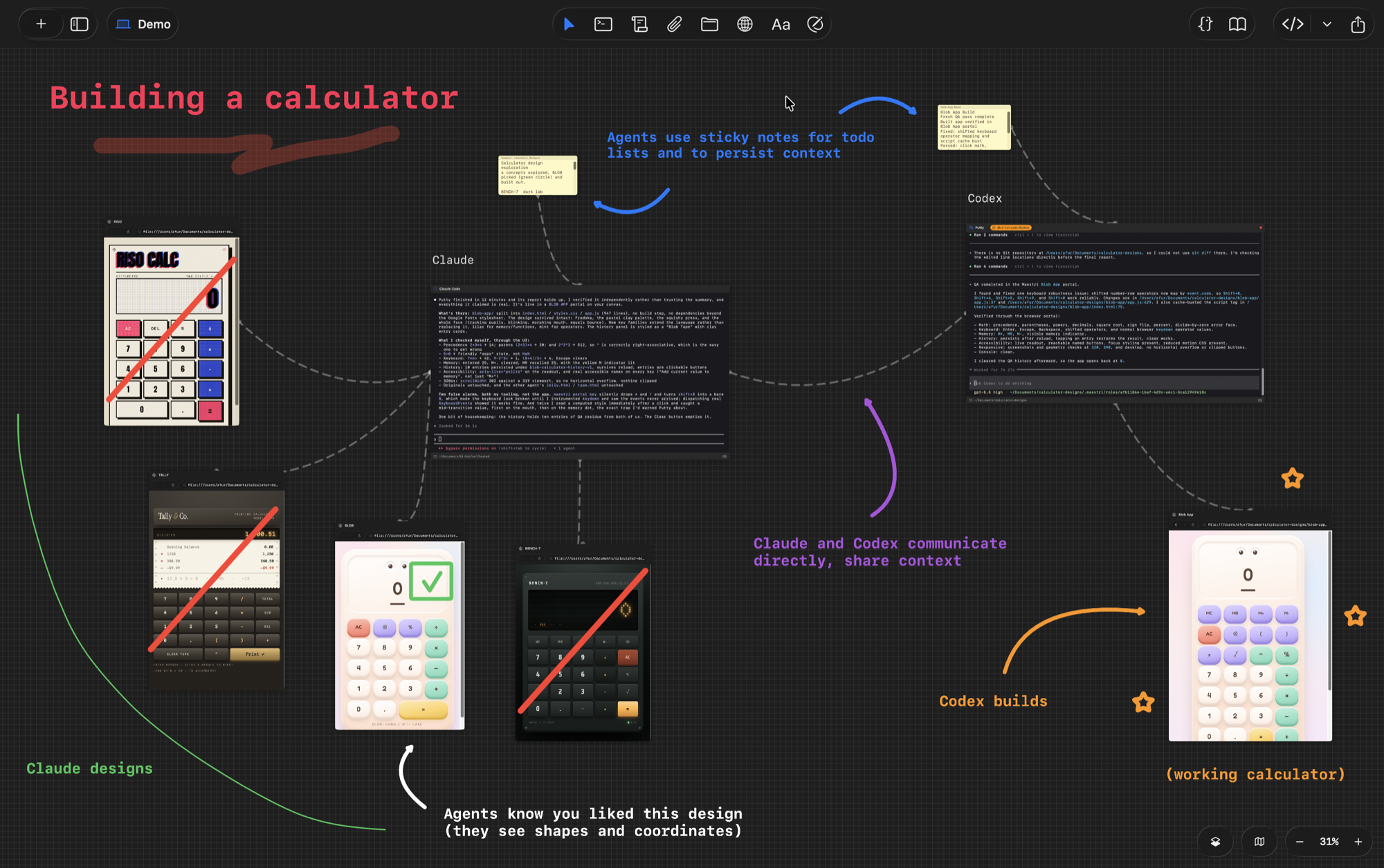
As a conductor, I spoke with Claude while it iterated on a few calculator designs. I then marked my favourite option with a checkmark shape.
As an orchestrator, I put Claude in charge of spinning up a Codex agent to do the building part of the task. Claude was then responsible for checking in with Codex and updating the connected todo list, and I could leave my computer while the agents collaborated on the task. When both agents finished, the status menu alerted me and provided quick links to both agents.
A common interface for terminal agents
Across providers, terminal agents are not built with coordination in mind. Claude and Codex agents don’t know how to talk to each other, and they handle status differently.
For example, Codex emits one of running, paused or completed to reflect its status at any given point. But Claude Code exposes events like permission_prompt and idle_prompt via its hooks. This makes figuring out an agent’s status a game of reverse engineering and syncing up each provider’s architectural choices.
Maestri handles this complexity behind a clean interface:
- The terminal node: a full PTY session with presets for Claude Code, Codex, and other providers, or a plain shell. Sits natively on the canvas just like a sticky note or sketch.
- The
maestriCLI: injected into every terminal session, giving agents a way to inspect connected context, communicate with other terminals, manage notes, and open portals:
maestri list           # what is wired to this terminal
maestri ask            # prompt another agent, wait for it
maestri check          # read another agent's terminal now
maestri note create    # put a sticky note on the canvas
maestri note edit      # update one that is already there
maestri portal create  # open a web page on the board
Maestri injects a local IPC socket into each terminal subshell. When an agent runs a maestri command, the CLI queries the canvas over that socket, turning visual wires and nearby notes into structured context the agent can read.
How I use Maestri
Here are a few examples of how Maestri has improved my workflow. They span conducting and orchestrating, and combine documented features with my own customisations.
Passing tasks and context between agents
Scenarios:
- You have run out of Claude tokens, but still have Codex tokens. You want Codex to pick up Claude’s unfinished task.
- You are talking through a complex problem with Claude. You want Codex to sanity check the conversation thus far.
- Your Claude conversation is bloated with too many topics. You want to split out topics to separate terminal agents, so each focuses on one.
- You want a Claude agent to spin up and manage a few Claude and Codex agents, to collaboratively finish a task.
In Maestri, you drag a wire between two terminals. Once connected, the second agent can inspect the source terminal’s history directly. This can also be done without dragging wires visually: agents can use Maestri’s CLI to pass context to each other.
One conversation had drifted into two topics, so I passed one thread to a second Claude session.
Collaborative whiteboarding
Suppose you are diagramming on a canvas. You could also be sketching or doodling.
Scenarios:
- You want Claude to comment on the diagram as you iterate on it.
- You want Claude to generate a polished version of the diagram.
- You want Claude to generate the diagram from scratch.
I sketch the rough structure; Claude turns it into a UML diagram.
Working with portals
Scenarios:
- You ask an agent to find ten frontend portfolios and want to compare them without opening ten browser tabs yourself.
- You are editing a web page with an agent and want the live page beside its terminal.
- You want an agent to QA an application across browsers and screen sizes, with each result visible on the board.
Ten links in a terminal become ten live pages I can compare on the canvas.
Routing your attention to the right agent
Scenarios:
- You have several agents running and want to see what each is working on without opening every terminal.
- You want to know when an agent finishes or needs your input.
- You remember part of an earlier conversation, but have no idea where to find the agent.
- You want to have long-running background agents that you don’t simply forget about.
- Topic notes: I wrote a skill that every agent loads, which tells it to run
maestri note createat the start of a session andmaestri note editwhenever the topic changes. The note auto-links to its parent terminal, and the first line is a summary of the current topic which the agent keeps in sync. When zoomed out, the note gives immediate visual context:
Each terminal names its current task in a note that stays readable when I zoom out.
- Attention badges: Rather than polling each terminal manually, Maestri flags any terminal that has finished or requires input, and aggregates alert counts onto the workspace rail. You can spot waiting agents at a glance:
Red dots show which agents need me, even when they are working in another workspace.
- Full-text search:
⌘Popens a fuzzy search across all board content, matching text inside notes as well as titles, and jumps directly to the matching node.
⌘P finds text inside terminals and notes, then takes me to the matching node.
- Dedicated workspaces: I keep most active work in a general workspace, but use dedicated workspaces for tasks and topics that make sense in isolation. For example, I have a workspace for researching movies and series, as well as finding and syncing up subtitles.
My general board beside the workspace I keep for movies, both reduced to the shapes of their terminals, notes and portals.
Recurring actions
Scenarios:
- You want an agent to review your todo list every Sunday and flag anything overdue.
- You want a research agent to scan job boards or news sources several times a day.
- You want recurring tasks to use the local files, tools and credentials already available to your terminal agents.
- You want to choose between Claude and Codex without tying the schedule to one provider.
Maestri Routines deliver prompts to any local agent on a cron schedule configured in the canvas UI:
At 10:00, the agent checks available domains, updates the note and portal, then emails me the result.
Notes
Footnotes
-
I am also a little biased towards visual interfaces. I prefer GitHub Desktop to git in the terminal, and frontend to backend development. But I still resonate with the conductor-orchestrator framing. ↩
-
I actually got distracted and researched the Excalidraw MCP, during which I stumbled upon Maestri. It stood out for me because the headline included “orchestrating AI agents”. ↩
-
Canvas-based agent orchestration is a growing category. Two open source alternatives which look interesting: OpenCove and NodeTerm. ↩